




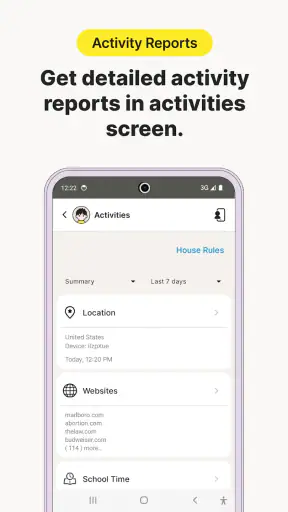

I approached Norton Family as a parent would: not as a way to win an argument about screen time, but as a tool for creating clearer boundaries around a child’s online routine. It is a free parenting app from NortonMobile, designed to help manage the time children spend online. That sounds simple, yet the real value depends on how consistently a family uses those boundaries and how willing the child is to discuss them.
My overall impression is mixed but useful. The app can make an otherwise vague household rule more visible and easier to manage, especially when parents are trying to bring structure to several devices or different daily routines. At the same time, parental-control software is never a substitute for conversation, and this particular app will feel more practical to some families than others. Its average rating is 3.2 from around 27,000 ratings, which suggests a product with a meaningful audience but also plenty of room for frustration.
How Norton Family fits into everyday parenting
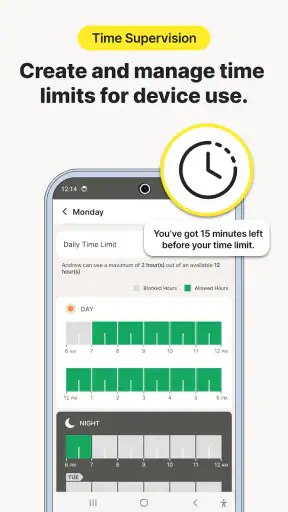
The first thing I noticed about this kind of app is that its usefulness begins before a limit is ever enforced. A child may hear “less screen time” as an abstract complaint, while a parent may be reacting to bedtime, homework, or an unexpectedly long gaming session. A control app gives the family a shared point of reference. Instead of relying entirely on memory or repeated reminders, parents can use it as part of a routine for deciding when online time should begin, when it should end, and what happens on unusually busy days.
Norton Family belongs in the parenting category rather than the entertainment category, and that distinction matters. It is not something I would install for a child to explore independently. The parent is the person who needs to set expectations, check the arrangement, and explain why the rules exist. The child’s experience is only one side of the product; the other is the parent’s ability to maintain a calm, predictable system.
The app has been available since February 1, 2012, and the current version is 7.9.6.25. It supports Android 8.0 and later, which makes it relevant for families using older Android phones as well as newer ones. The age classification is Everyone, but that should not be confused with “suitable without adult involvement.” The rating describes the app itself, while the decisions made through it still require responsible parenting.
The cost is straightforward, but value is not automatic
Norton Family is free, so there is no purchase decision to make before trying it. That is an important advantage for parents who want to test a routine without committing money first. It also makes the app easier to consider when a family is unsure whether digital controls will reduce conflict or simply add another layer of management.
Free access does not mean every family receives the same value. The benefit comes from using the app consistently, reviewing whether the rules fit the child’s age, and adjusting the household routine when circumstances change. A free tool that is ignored after installation has little practical value. A free tool that helps a parent replace repeated reminders with a clear plan can be worthwhile even if it is used in a fairly limited way.
I would also avoid judging the app only by its download count. It has passed one million installs, which shows that many families have tried it, but popularity does not tell me whether it will suit a particular household. The more useful question is whether your family needs a dedicated way to organize online time, rather than whether the app is widely used.
What the app can add to a family routine
The strongest use case is a household where online access is becoming difficult to track. Perhaps a child moves between homework, videos, games, and messaging, while the parent keeps having to ask how long the device has been in use. In that situation, Norton Family can turn a loose promise into a more deliberate arrangement. The parent can discuss the schedule in advance, explain the reason for it, and use the app as a reminder of the agreement rather than as a surprise punishment.
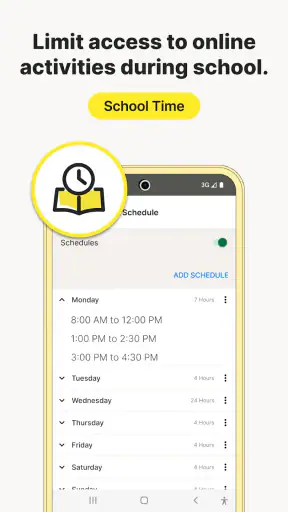
A realistic example would be a school night when a child has finished homework but wants to continue using a phone. Without a plan, the conversation can become a negotiation that starts again every evening. With a parental-control routine in place, the family can agree earlier on when online time ends. If the child needs extra time for a school task, the parent can treat that as an exception to discuss rather than abandoning the entire rule. This distinction is important: a control system works best when it supports judgment instead of pretending every day is identical.
One less obvious benefit is that the app can help parents notice patterns in their own decisions. If rules are changed repeatedly because bedtime, weekends, and school projects all collide, that inconsistency may be the real problem. I would use the first week as an observation period rather than trying to create a perfect schedule immediately. Write down the moments that cause friction, then make one or two changes instead of changing everything at once.
Another practical insight is to introduce the app during a calm conversation, not during a conflict. Installing a control tool immediately after a child breaks a rule can make it feel like surveillance or retaliation. Explaining it beforehand gives the child a clearer sense of what is changing. That does not remove disagreement, but it makes the boundary easier to understand.
Where the experience can become frustrating
Parental controls often create friction at the edges of a rule. A child may be doing something useful online when the agreed period ends, or a parent may forget that a special schedule was needed for a project, travel day, or family event. If the app becomes a rigid authority that nobody is allowed to question, ordinary exceptions can turn into arguments. I would keep a simple family process for requesting extra time and make it clear that an exception is not the same as a permanent change.
There is also a trust trade-off. Some parents want strong oversight because their child is young or has difficulty stopping independently. Older children may respond better when the app is paired with increasing responsibility. Using the same level of control for every age can make the system feel unfair, while giving complete freedom too early can undermine the purpose of installing it. Norton Family may help structure this transition, but the parenting decision remains yours.
The store rating of 3.2, together with roughly 2,500 written reviews, is a useful warning against expecting a flawless experience. I would not treat the app as a guarantee that every device, schedule, or family arrangement will feel effortless. Any parent choosing it should be prepared to spend time setting expectations and troubleshooting the routine. The free price lowers the financial risk, but it does not remove the time cost.
Compatibility is another practical checkpoint. Android 8.0 is the minimum operating system, so an older Android device below that requirement is not a suitable starting point. Families using both Android and iOS should also think carefully about how they want to manage the household as a whole. A tool may be convenient on one platform but less convenient if the parent’s phone, the child’s phone, and other devices do not fit the same setup. I would check the devices you actually intend to use before building family rules around the app.
Small workflow changes that make it more useful
The first workflow I recommend is separating normal days from exceptional days. Create the ordinary school-night expectation first, then decide how weekends or holidays will be handled. This prevents a single flexible day from weakening the rule for the rest of the week. It also gives the child a reason for the difference instead of making every limit appear arbitrary.
The second is to review the arrangement with the child after several days. Do not ask only whether the app is liked. Ask which transition causes the most difficulty, whether the timing clashes with homework, and whether the child understands what to do when an important task runs late. These questions reveal whether the schedule is realistic. They also make the app part of a problem-solving conversation rather than a silent enforcement mechanism.
The third is to keep the parent’s role visible. If the child believes that an app, rather than a parent, is making every decision, the household may lose an opportunity to teach self-management. I would explain that the tool helps organize the rule, while the parent remains responsible for changing it when there is a genuine reason. That approach is especially important as children become more independent.
A fourth trade-off concerns simplicity. Some families need only a clear time boundary and will appreciate not having to manage a complicated system. Others expect detailed controls, extensive reporting, or highly customized rules and may find a basic time-management focus too narrow. Before installing it, decide whether your main problem is duration, content, device variety, or communication. Norton Family is most naturally aligned with the first of those concerns.
Who is likely to get the most value?
I think the app is a good fit for parents who want a free starting point and who are willing to make online-time rules part of a broader family routine. It is particularly suitable when a child repeatedly loses track of time, when a parent is tired of issuing the same reminders, or when several adults in the household need a more consistent approach. The app can also help families test whether formal limits improve evenings before considering a more elaborate paid solution.
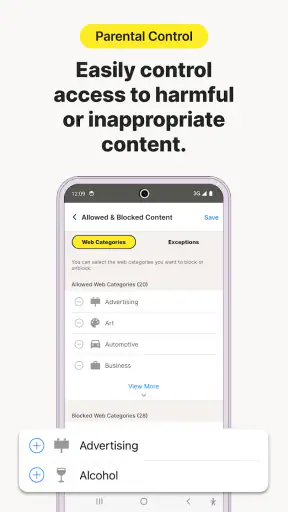
It is less suitable for parents looking for a completely hands-off solution. Installing it will not teach a child why sleep, schoolwork, and offline activities matter. It also may not be the best choice for a family whose main concern is detailed content supervision rather than the amount of time spent online. In that case, a different parental-control product focused more heavily on content categories or broader device management could be a better match, assuming its features and price fit the family.
I would also hesitate to recommend it as the only tool for an older teenager who already manages screen time responsibly. A collaborative agreement, regular check-ins, and gradual independence may work better than strict controls. Conversely, families with younger children may value clearer limits, but they should expect to remain actively involved. The app can support a parenting strategy; it cannot replace one.
My final recommendation
My verdict is cautiously positive. Norton Family offers a free way to bring more structure to children’s online time, and that alone makes it worth considering for parents who are currently relying on repeated verbal reminders. Its long availability, current Android support, and large install base make it an accessible option to try, while the modest average rating tells me to approach it with realistic expectations rather than assuming a smooth experience for everyone.
The best value is not the installation itself; it is the clearer family agreement built around it. If you are ready to explain the rules, review them, and allow sensible exceptions, the app can make everyday boundaries easier to manage. If you want invisible supervision, perfect enforcement, or a solution to every online-safety concern, I would skip it and look for a tool that matches that narrower need more closely.
For me, the free price makes experimentation reasonable. I would install it only after deciding what problem I am trying to solve, check that the intended Android devices meet the requirement, and begin with one realistic schedule. If that routine reduces arguments and helps the child recognize when online time is ending, Norton Family is doing something valuable. If it simply adds technical frustration without improving communication, the right decision is to stop using it rather than keep tightening controls.


